This sabrent usb hub review looks at the HB-6PNV, a six-port USB-C hub that combines display output, Gigabit Ethernet, charging pass-through, and an M.2 SSD enclosure.
Its appeal is consolidation, though buyers should pay attention to the drive’s 5Gbps ceiling and the host requirements for video.
SABRENT HB-6PNV Review Summary
The quick verdict
188,000+ ratings
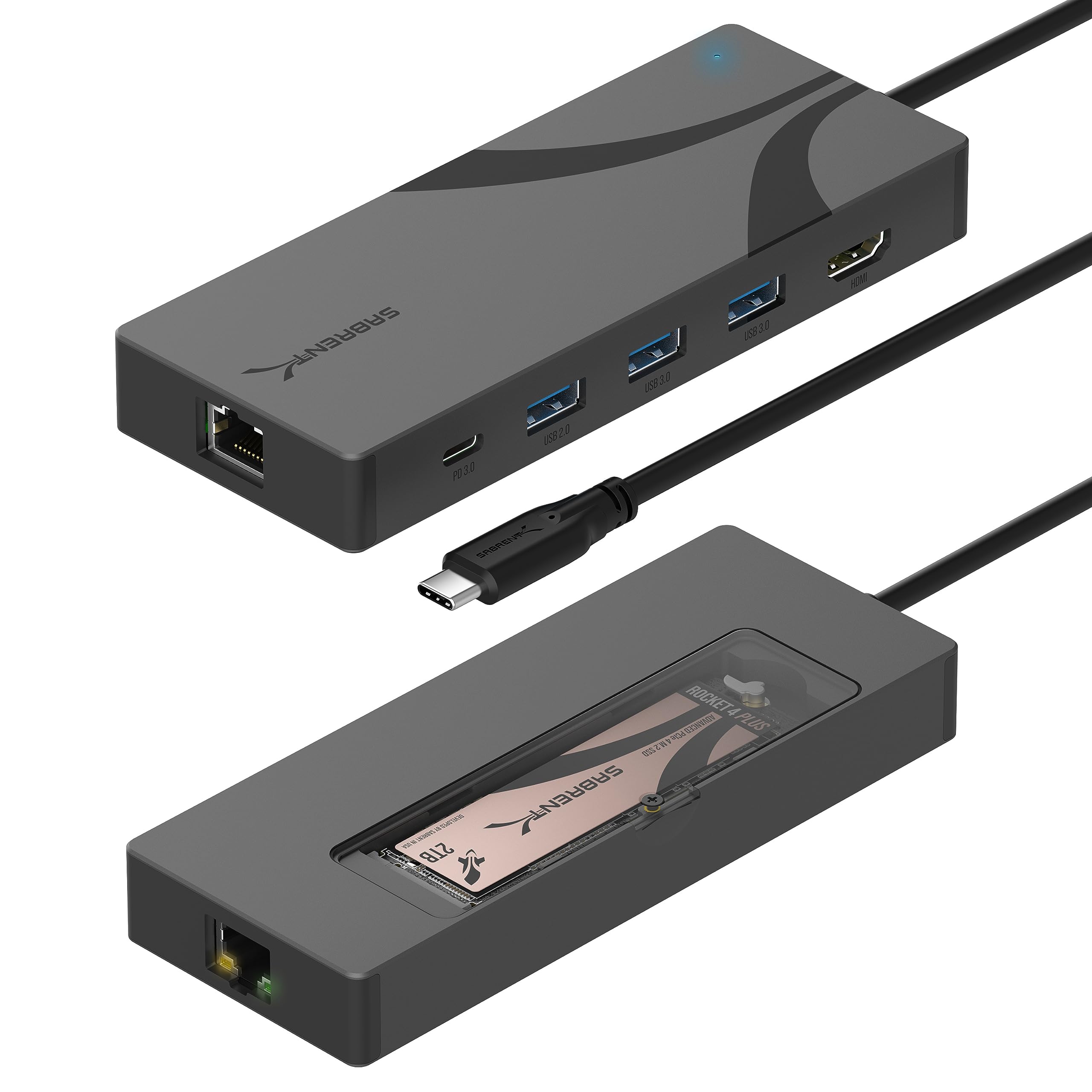
Read Amazon ReviewsSABRENT HB-6PNV USB-C Hub and M.2 SSD Dock
A strong fit for laptop users who want display, wired networking, everyday USB ports, and an internal M.2 drive through one USB-C hub.
- Six-port USB-C hub with an integrated M.2 SSD enclosure; compatible with M.2 NVMe and SATA drives in 2242, 2260, and 2280 lengths. Drive is sold separately.
- The integrated host cable connects at 10Gbps; the internal M.2 slot supports up to 5Gbps.
- HDMI 2.0 output supports one external display at up to 4K resolution and 60Hz. The connected computer must support DisplayPort Alternate Mode over USB-C.
- RJ45 port provides Gigabit Ethernet for a wired network connection.

Pros
- Combines storage expansion, display output, wired networking, charging pass-through, and USB-A connections in one hub.
- Accepts both NVMe and SATA M.2 drives in three common lengths.
Consider before buying
- The M.2 slot runs at up to 5Gbps, so a faster drive cannot reach its full rated speed through this hub.
- The drive and USB-C charger are separate purchases; charging pass-through depends on connecting a compatible charger.
Read the full review summary
The HB-6PNV brings several desk and travel connections together: one HDMI output, wired Gigabit Ethernet, three USB-A ports, USB-C pass-through charging, and a slot for an M.2 NVMe or SATA drive.
Its integrated cable connects to a compatible host at 10Gbps, while the internal drive connection supports up to 5Gbps.
That split matters: the hub can be convenient for backups and project files, but it will not expose the full rated speed of a faster NVMe drive.
It suits someone with a USB-C laptop or tablet who wants a compact dock and is willing to supply both an M.2 drive and a USB-C charger.
The aluminum body, thermal pad, and included mounting hardware make the storage function more integrated than a separate drive enclosure.
Before choosing it, confirm that the host supports DisplayPort Alternate Mode if you need HDMI, and check that your drive is one of the supported lengths.
The buying factors
SABRENT HB-6PNV Scorecard
Editorial scores reflect listed features and buyer fit; they are not laboratory measurements or customer ratings.
Connection variety
Six ports cover display, wired networking, USB-A accessories, and storage in one unit.
Storage integration
The built-in slot accepts M.2 NVMe or SATA drives in three common lengths, with a thermal pad.
Drive bandwidth
Up to 5Gbps is useful for ordinary transfers, but limits the benefit of higher-speed NVMe drives.
Display support
HDMI supports one display up to 4K at 60Hz, subject to host DP Alt Mode support.
Charging convenience
Up to 90W USB PD passes through to the host, but the charger must be supplied separately.
Port flexibility
Two USB-A ports support 5Gbps, while the third is USB 2.0 for lower-bandwidth peripherals.
Key Features and Specifications of SABRENT HB-6PNV
- Six-port USB-C hub with an integrated M.2 SSD enclosure; compatible with M.2 NVMe and SATA drives in 2242, 2260, and 2280 lengths. Drive is sold separately.
- The integrated host cable connects at 10Gbps; the internal M.2 slot supports up to 5Gbps.
- HDMI 2.0 output supports one external display at up to 4K resolution and 60Hz. The connected computer must support DisplayPort Alternate Mode over USB-C.
- RJ45 port provides Gigabit Ethernet for a wired network connection.
- Two USB-A ports support up to 5Gbps at 5V/900mA each; a third USB-A port supports USB 2.0 at up to 480Mbps.
- USB PD 3.0 pass-through supports up to 90W to the host when a compatible USB-C charger is connected. A charger is not included.
- Aluminum enclosure with integrated thermal pad, onboard activity LED, and included M.2 fastener, heatsink screw, screwdriver, and manual.
Pros and Cons of SABRENT HB-6PNV
Pros
- Combines storage expansion, display output, wired networking, charging pass-through, and USB-A connections in one hub.
- Accepts both NVMe and SATA M.2 drives in three common lengths.
- Two USB-A ports provide 5Gbps connections for compatible storage and accessories.
- Aluminum construction and a thermal pad are included in the storage enclosure design.
Consider before buying
- The M.2 slot runs at up to 5Gbps, so a faster drive cannot reach its full rated speed through this hub.
- The drive and USB-C charger are separate purchases; charging pass-through depends on connecting a compatible charger.
- HDMI works only when the host USB-C port supports DisplayPort Alternate Mode, and the hub provides one display output.
- The M.2 slot fits 2242, 2260, and 2280 drives; buyers with 2230 or 22110 drives should choose another enclosure.
Who Should Buy SABRENT HB-6PNV?
Good fit
Consider the HB-6PNV if you regularly move between a laptop and a desk and want one connection for common peripherals, a wired network, an external display, and an internal M.2 drive.
It can reduce the need to carry a separate hub and SSD enclosure, particularly when your storage tasks involve backups, photos, or project files rather than chasing maximum NVMe throughput.
It is also a practical option if you already have a compatible M.2 drive and USB-C charger.
Check the drive length, confirm that your computer supports video over USB-C, and make sure the host’s charging needs fit within the hub’s up-to-90W pass-through capability.
Who should skip it
Skip it if your main goal is to get the full rated performance of a high-speed NVMe drive; the internal slot is limited to up to 5Gbps.
Choose a different setup if you need more than one HDMI display, an SD or microSD reader, or a drive length outside 2242, 2260, and 2280. Confirm those needs before relying on this as your only dock.
How the SABRENT HB-6PNV Fits a Laptop Setup
A hub with storage built in
The integrated M.2 slot is the HB-6PNV’s defining feature.
It lets the hub serve as a drive enclosure as well as a port expander, so a compatible SSD can travel with the hub instead of requiring its own separate case.
The drive is not included, and the 5Gbps slot speed sets a clear limit: this arrangement prioritizes convenience and a tidy setup over extracting the maximum speed from a high-end drive.
Check the USB-C video path
HDMI output is useful for a desk monitor or presentation screen, with support for one display at up to 4K and 60Hz. The deciding compatibility detail is the host’s USB-C port: it needs DisplayPort Alternate Mode.
If that feature is uncertain, check the computer maker’s specifications before buying, because a data-capable USB-C connection alone does not establish video support.
Charging depends on your own adapter
The hub passes up to 90W of USB Power Delivery to the connected laptop or tablet when a USB-C charger is plugged into it.
That makes a single-cable desk connection possible for data and host charging, but the charger is not in the box.
The USB-A ports are described separately at 5V/900mA for the two faster ports, so treat the 90W figure as host pass-through rather than power available from those ports.
A deliberate mix of port speeds
The three USB-A ports are not equivalent: two handle up to 5Gbps, while the third is a 480Mbps USB 2.0 connection.
That division works well for placing faster peripherals or storage on the first two and lower-bandwidth devices such as a keyboard or mouse on the third.
Gigabit Ethernet adds a wired network option, rounding out a compact dock for users who value a broad mix of connections over a larger number of identical high-speed ports.
Alternatives to SABRENT HB-6PNV
USB Hubs alternative

2,000+ ratings
Read Amazon ReviewsSABRENT HB-MC3B 4-Port Aluminum USB 3.0 Hub
Choose the HB-6PNV when display, wired networking, host charging, or integrated M.2 storage are important. The HB-MC3B is a simpler fit if you only need four USB-A data ports and prefer a hub with a separate cable.
- The HB-MC3B provides four USB 3.0 ports with transfer speeds up to 5Gbps, plus backward compatibility with USB 2.0 and USB 1.1.
- Its supplied details describe a 2.5-foot USB 3.0 cable and compatibility with Windows, Mac, and Linux.
- The HB-6PNV combines six ports with HDMI, Gigabit Ethernet, charging pass-through, and an M.2 drive slot; its drive slot supports up to 5Gbps.
USB Hubs alternative
500+ ratings
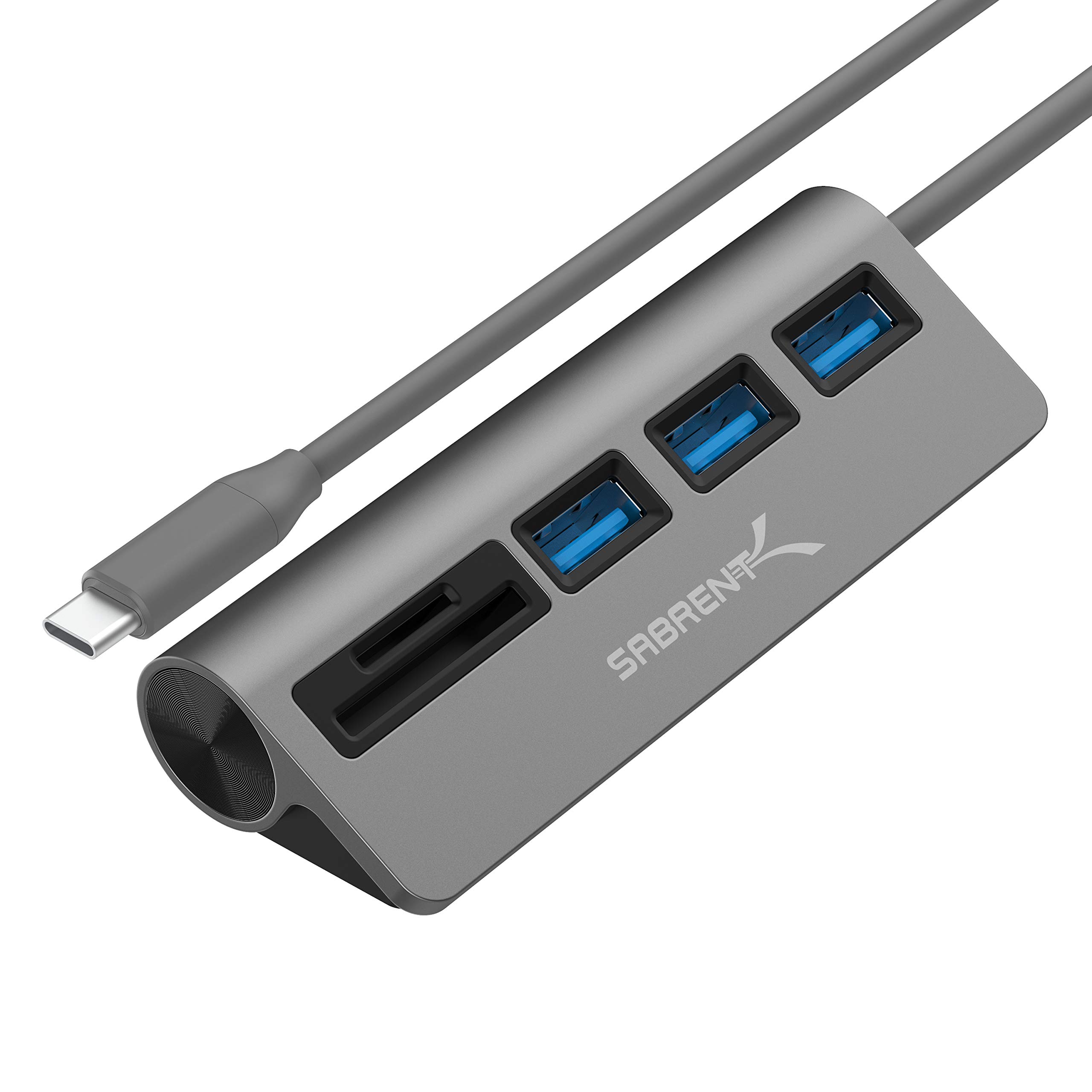
Read Amazon ReviewsSABRENT HB-U3CR USB-C 5-in-1 Hub
Pick the HB-6PNV for its M.2 storage enclosure, HDMI, Ethernet, and charging pass-through.
The HB-U3CR better matches a workflow centered on SD or microSD cards and three USB-A connections; its supplied features do not describe the same display, network, or M.2 functions.
- The HB-U3CR combines three USB 3.0 Type-A ports with SD and microSD card-reader slots, with data transfer up to 5Gbps.
- The HB-6PNV includes a built-in M.2 slot and HDMI output, plus Gigabit Ethernet and up to 90W host charging pass-through.
Is SABRENT HB-6PNV Worth It?
The SABRENT HB-6PNV is worth considering if you want a compact USB-C dock that also houses an M.2 drive.
Its combination of HDMI, Gigabit Ethernet, USB-A ports, and up-to-90W host charging pass-through can simplify a laptop setup, provided your host supports USB-C video and you bring a compatible charger and drive.
The key compromise is storage bandwidth: the M.2 connection supports up to 5Gbps, so the hub makes more sense for convenient everyday storage than for maximizing a fast NVMe SSD.
Check drive length and host compatibility before buying; if those fit your needs, it offers a useful mix of connections in one device.
Your review at a glance
188,000+ ratings
Read Amazon ReviewsSABRENT HB-6PNV USB-C Hub and M.2 SSD Dock
A strong fit for laptop users who want display, wired networking, everyday USB ports, and an internal M.2 drive through one USB-C hub.
- Six-port USB-C hub with an integrated M.2 SSD enclosure; compatible with M.2 NVMe and SATA drives in 2242, 2260, and 2280 lengths. Drive is sold separately.
- The integrated host cable connects at 10Gbps; the internal M.2 slot supports up to 5Gbps.
- HDMI 2.0 output supports one external display at up to 4K resolution and 60Hz. The connected computer must support DisplayPort Alternate Mode over USB-C.
- RJ45 port provides Gigabit Ethernet for a wired network connection.